Few things are more frustrating than driving to a store only to discover that the product you wanted is out of stock. Whether you're shopping for a graphics card, gaming console, television, laptop, or other electronics, checking inventory before leaving home can save time and frustration.
Fortunately, there are ways to check Best Buy inventory online and see which nearby stores may have stock available. By using a product SKU and your ZIP code, you can quickly identify stores reporting inventory and compare nearby locations.
Why Check Best Buy Inventory Before Visiting?
Many electronics products experience frequent inventory fluctuations. Popular products can sell out within hours, especially during product launches, holiday promotions, and major sales events.
- Save time by avoiding unnecessary trips.
- Find the closest store with available inventory.
- Compare multiple store locations.
- Identify products with limited stock.
- Check pricing before visiting.
How Best Buy Inventory Checking Works
Every product sold by Best Buy has a unique SKU (Stock Keeping Unit). By entering that SKU along with your ZIP code, inventory systems can determine which nearby stores may have stock available.
For example, popular products such as Nintendo Switch 2 systems, PlayStation consoles, OLED TVs, and NVIDIA graphics cards can often be searched using their Best Buy SKU numbers.
How to Use the UserQuote Best Buy Inventory Checker
UserQuote offers a free Best Buy Inventory Checker that makes it easy to search nearby inventory.
Step 1: Find the Product SKU
Locate the Best Buy SKU for the product you want to check. The SKU is typically listed on the Best Buy product page.
Example:
6614313
This SKU corresponds to the Nintendo Switch 2 system.
Step 2: Enter Your ZIP Code
Enter your ZIP code to search nearby Best Buy stores.
Step 3: Review Inventory Results
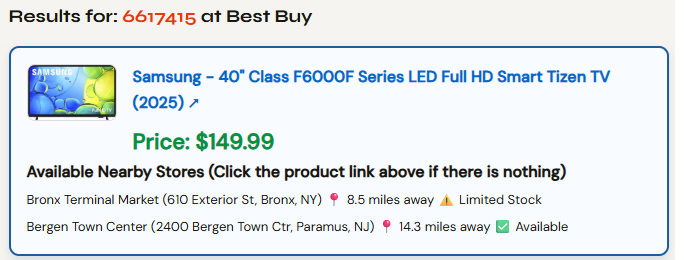
The inventory checker may display:
- Product image
- Product name
- Current Best Buy price
- Nearby store locations
- Store addresses
- Distance from your location
- Inventory status
Understanding Inventory Status
🟢 In Stock
The store is reporting available inventory for the product.
🟡 Limited Stock
Inventory appears to be limited and may sell out quickly. If you plan to visit the store, consider acting soon or calling ahead.
No Inventory Results
Some products may not return inventory information. This can happen when inventory data is not available, the item is sold through a marketplace seller, or the SKU is not supported by Best Buy's public inventory system.
No SKU Handy? Search by Product Name Instead
Don't have the SKU number pulled up? You don't need it. Just search by product name on the UserQuote Best Buy Inventory Checker — it finds the closest matching product and automatically checks nearby store stock for it, no manual SKU lookup required.
Here is an example output showing two stores with inventory available near zip code 10045.
Check Best Buy Inventory Now →
Popular Products to Track
Inventory checking is particularly useful for products that are frequently in high demand:
- NVIDIA GeForce RTX graphics cards
- PlayStation 5 consoles
- Nintendo Switch 2 systems
- OLED televisions
- Gaming laptops
- Computer components
- Apple devices
How UserQuote Helps
The UserQuote Best Buy Inventory Checker provides a fast way to check nearby inventory, view product pricing, compare store locations, and access product pages directly from one screen.
Instead of opening multiple store pages and manually searching locations, shoppers can quickly determine which stores may have inventory available.
Helpful Tips
- Inventory can change throughout the day.
- Limited Stock items may sell out quickly.
- Check multiple nearby ZIP codes if inventory appears unavailable.
- Call the store before making a long trip.
- Product launches often cause inventory to fluctuate rapidly.
The Bottom Line
Checking inventory before visiting a store can save time and help you find hard-to-locate products more efficiently. Whether you're shopping for a new gaming console, graphics card, laptop, or television, knowing which stores have inventory can make the buying process much easier.
Before heading out, take a few seconds to check nearby availability and increase your chances of finding the product you're looking for.
Try the Best Buy Inventory Checker
Search nearby Best Buy inventory using a SKU or product name and ZIP code to find products faster.
Check Inventory Now